Disclosure: This post may contain affiliate links. If you click on a link and make a purchase, I may earn a small commission — at no extra cost to you. I only recommend tools and resources I genuinely find useful.
Building a presentation used to mean hours of aligning text boxes, hunting for the right font pairing, and fighting with slide layouts that never quite look right. Gamma AI skips all of that. You describe what you want in a sentence, and the AI builds the presentation, document, or website for you — structure, design, and content included.
Try it: Try Gamma AI for free here
What is Gamma AI?
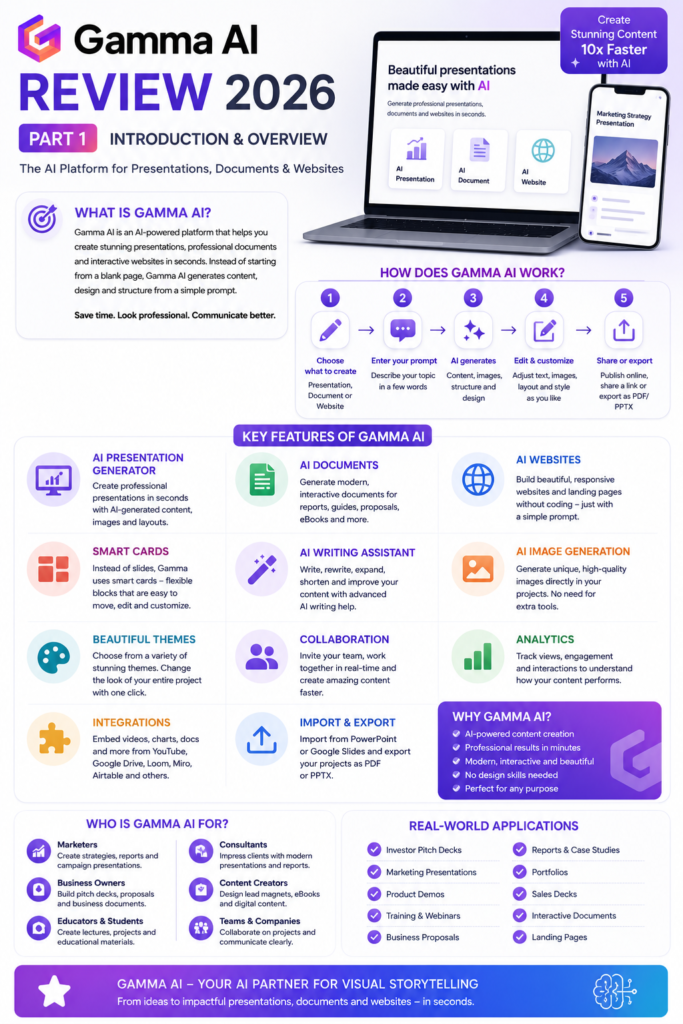
Gamma AI is a cloud-based platform that uses artificial intelligence to generate presentations, documents, and interactive websites from a simple text prompt. Instead of manually formatting every slide the way you would in PowerPoint, the AI builds the structure, picks a layout, and applies a visually balanced design automatically.
It’s used by a genuinely wide range of people:
- entrepreneurs and consultants
- marketers and content creators
- students and teachers
- startups, SaaS companies, and agencies
- corporate teams
How Gamma AI Works
The workflow is refreshingly simple, and it stays the same whether you’re building a presentation, a document, or a website:
- Choose what to create – presentation, document, or website.
- Enter your prompt – describe your topic in a few words, e.g. “Create a presentation about AI tools for affiliate marketing.”
- Let the AI generate – titles, content, images, structure, and layout appear in seconds.
- Edit and customize – adjust text, swap images, rearrange cards, change the theme.
- Share or export – publish online, share a link, or export as PDF/PowerPoint.
What stood out to me testing the dashboard is how little of this feels like work. You’re mostly reacting to and refining what the AI already gave you, rather than building from a blank page.
Key Features
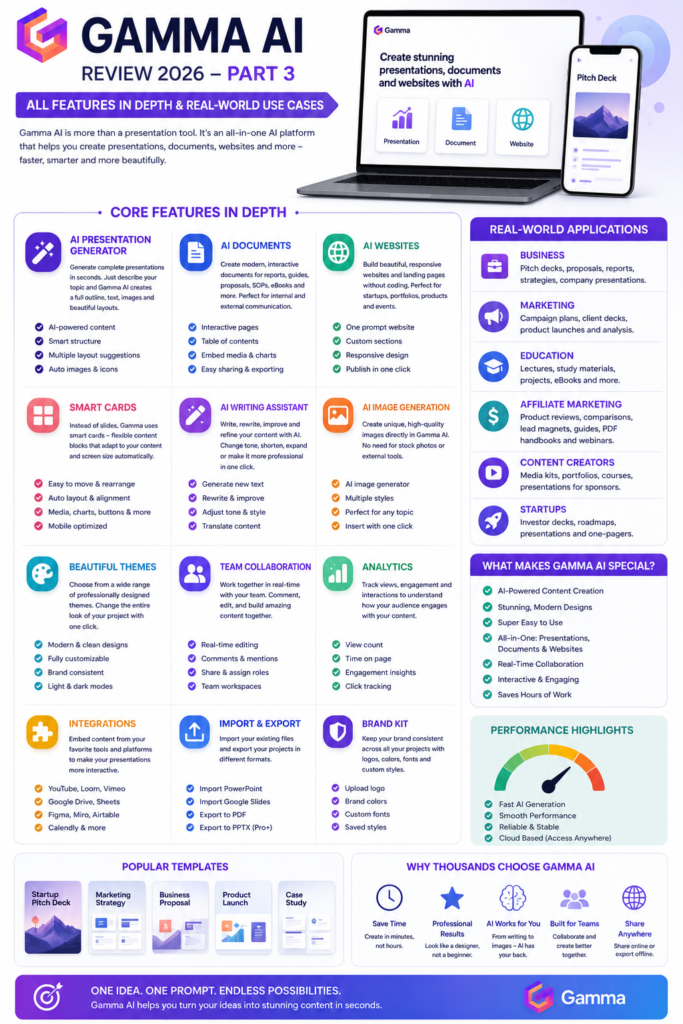
- AI Presentation Generator: Turns a short prompt into a full deck with titles, structure, images, and layout.
- AI Documents: Interactive, modern documents for reports, guides, eBooks, and proposals.
- AI Websites: Generate landing pages, portfolios, and product pages with no coding at all.
- Smart Cards: Instead of rigid slides, content lives in flexible cards that auto-adjust and are easy to move around.
- AI Writing Assistant: Write, rewrite, shorten, expand, or change the tone of any text on the fly.
- AI Image Generation: Generate on-brand images directly inside your project, no separate tool needed.
- Beautiful Themes: One click changes colors, typography, and layout across the entire project.
- Brand Kit: Keep logos, brand colors, and fonts consistent across every project (paid plans).
- Team Collaboration: Multiple people can edit, comment, and build a project together in real time.
- Analytics: Track views, time spent, and engagement once your project is shared.
- Integrations: Embed content from YouTube, Google Drive, Figma, Loom, Miro, Sheets, Airtable, and Calendly.
- Import & Export: Import existing PowerPoint or Google Slides files, and export to PDF or PPTX.
Pricing
Gamma AI offers four tiers, so it scales with how much you actually use it:
- Free: Limited AI credits, basic themes, link sharing – good enough to try the platform before committing.
- Plus: More AI credits, unlimited presentations, premium themes, PDF and PowerPoint export.
- Pro: Brand Kit, Analytics, Team Collaboration, and priority processing – the most popular tier for agencies and freelancers.
- Enterprise: Centralized admin, SSO, and dedicated support for larger organizations.
Gamma AI vs. the Alternatives
Gamma AI vs. Canva: choose Gamma AI if you want the AI to build the content and structure for you; choose Canva if you’re mainly doing graphic design or social media posts.
Gamma AI vs. Beautiful.ai: both automate slide design, but Gamma adds AI-written content, documents, and websites on top.
Gamma AI vs. Tome: Gamma now offers more templates, a more polished interface, and a broader feature set.
Gamma AI vs. PowerPoint: PowerPoint still wins on complex animations and full manual control; Gamma wins on speed and automatic design.
Pros and Cons
Pros
- No design skills required to get a professional result
- Extremely fast generation – a full deck in seconds
- Modern, consistent design out of the box
- Built-in AI writing assistant
- Real-time team collaboration
- Large template library
Cons
- Free plan is limited for heavy, regular use
- Less control over complex custom animations than PowerPoint
- AI-generated text is a strong starting point, but usually still needs a human edit for tone and accuracy
Overall Rating
| Category | Rating |
|---|---|
| Ease of use | 5/5 |
| AI Presentation Generator | 5/5 |
| Design quality | 5/5 |
| AI Writing Assistant | 5/5 |
| AI Documents | 5/5 |
| AI Websites | 4.5/5 |
| Templates | 5/5 |
| Team collaboration | 5/5 |
| Value for money | 4.5/5 |
| Good for beginners | 5/5 |
Frequently Asked Questions
Is Gamma AI free?
Yes, there’s a free plan with limited AI credits.
Can it create documents and websites, not just presentations?
Yes, both are built in.
Does it work with PowerPoint?
Yes, you can import and export .pptx files.
Is it good for students?
Yes, it’s one of the most popular user groups.
Is it suited for affiliate marketing?
Yes, product reviews, comparisons, PDF guides, and lead magnets all work well.
Final Verdict
Gamma AI isn’t just another presentation tool — it’s an AI platform that combines content generation, design, and collaboration in one place. If you regularly need to turn ideas into a professional-looking presentation, document, or web page and don’t want to spend hours on formatting, it’s well worth trying.
Try it: Try Gamma AI for free here